There is a tutorial video now as well — the whole thing start to finish in under three minutes, using the demo stems that ship with the app.
StemMaster shipped at 1.1.0 at the start of August. It is at 1.1.33 now. Rather than list thirty-three changelog entries, here are the four things that actually changed how it is used — with the numbers behind them, because the claims worth reading are the ones you can check.
It got faster, and here is where the time went
Speed on a tool like this is mostly about not doing work twice, and three separate places were doing exactly that.
The mix was being built twice. StemMaster renders your master, then listens back and applies a bounded correction if the result has drifted from the target curve. That second pass only ever needed the master-bus corrections, which do not change what any individual track contributes to the sum — so the mix is built once and handed to both passes.
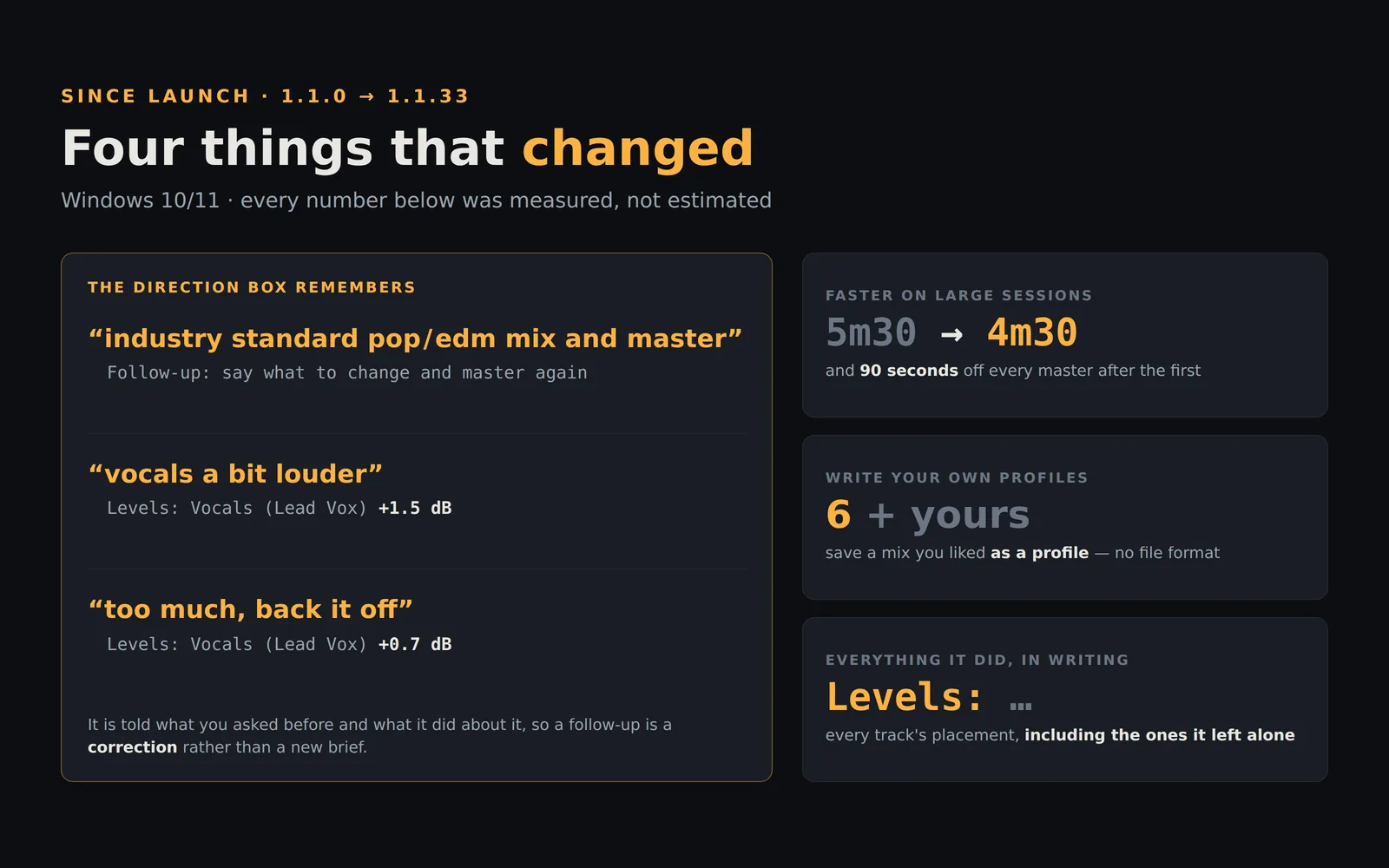
The session was being measured on every master. Before it mixes anything, StemMaster measures every stem — loudness, frequency balance, dynamics, stereo image — then the mix, then where the song's sections fall. On a long high-rate session that is the single biggest part of the wait, and it was being redone from scratch every time you pressed the button. Change the profile, type a different direction, mark a stem Primary: none of that changes what your audio measures. It is measured once now and kept for as long as those stems are loaded, which takes about a minute and a half off every master after the first.
And the sum itself was moving about half a gigabyte per stem. It walks the song in 64k chunks now, accumulating into a buffer small enough to stay in cache. Same additions, same order.
Measured end to end on the session this was tested against — eight tracks, five and a half minutes, 96 kHz — a full mix and master went from about five and a half minutes to about four and a half. None of it came from doing less to your audio, which is the only kind of speed-up worth having on a mixer: the renders are bit-identical to the ones before the change.
The optional AI engine had a separate and worse problem. It was allowed a fixed three minutes to answer no matter how big your session was — a budget chosen when the sessions being tested were eight tracks. A 36-track project needs closer to four minutes, because the model has to decide settings for every stem you have loaded. So it ran out of time, and then tried three more times at the full three minutes each. A 36-track project spent twelve minutes failing its way back to the built-in engine. The budget scales with your stem count now. The same session on the same machine measured six and a half minutes and produced a master.
You can write your own sound profiles
The six built-in profiles are tonal destinations — Warm/Vintage, Bright/Modern, Bass-Heavy and so on — not genres. A tester made the point that a technically clean master of a classic record is a clean master of a record that is not clean, and that six destinations are not a map of recorded music. So profiles became writable.
The easy route needs no file format at all. Master your song, move the faders and the width sliders until it sounds right, then File → Custom Profiles → Save This Mix as a Profile. Your deviations from the engine's own decisions become the profile. No JSON, no restart.
The by-hand route is still there — Open Profiles Folder, copy the worked example already sitting in it, Reload Profiles, and yours appears in the dropdown under the built-in six. A profile can carry a tonal tilt, which works on the built-in offline engine with no key at all, and it can carry notes for the optional AI engine. You only need one of the two.
The Direction box remembers what you asked for
This is the newest of the four and it changes how the app is used more than anything else on the list.
The Direction box used to be a fresh brief on every render. To nudge one thing you had to describe the whole mix again and hope the rest came out the same — which is not how anyone talks to an engineer.
It is a conversation now. Master, type vocals a bit louder, master again — and the AI engine is told what you asked before, what it reported doing, and that this newest message is a change to the mix you just heard. Say too much, back it off next and it knows what "it" is. After the first master the panel invites the follow-up, so you do not have to know the box works this way in order to find out; from the second message on it lists the conversation so far.
Two honest limits, both stated in the app rather than left to be discovered.
This needs the optional AI engine and your own API key. The built-in analysis engine is offline and is the default, and it reads only your latest message — matching a whole conversation would re-apply requests you had already withdrawn, so it uses the newest one and tells you how many earlier messages it is not reading rather than ignoring them quietly.
And the conversation is the first thing here whose cost grows with use: every message resends the session's measurements plus the exchange behind it. So the panel reports what actually went — how many round trips, and how many kilobytes, on your own API key. What that costs in money depends on your model and your provider, which is the only place the price is known, so the app does not invent one.
On both engines, the thing that leaves your machine is measurements. Your audio never does.
And the notes say what it did — including where it put things
The Engine Notes panel lists every decision: the sidechain it set and which track keyed it, the reverbs and their decay times, the dynamic EQ, the transient shaping, the section automation with timecodes.
Three things joined that list recently, and all three exist because a readout that is nearly honest is worse than none.
Whose words you are reading. Almost every line in that panel is StemMaster reporting a measurement. On the AI engine one paragraph can be the model's own summary instead — and those two sat together with nothing to tell them apart. That paragraph now carries a heading saying it is the model's account of its own intent and is not checked against what was rendered. Everything above and below it is.
Which track, not just which type. If your kit arrives as five separate mics, every drum line says Drums — and +3 dB of attack is an ordinary choice on a kick and a mistake on a hi-hat. Where tracks sharing a type were treated differently, the notes name them. Where they were treated alike they still collapse to one line with a count, so a stack of fifteen backing vocals is one line and not fifteen.
Where every track was placed. The newest line, and the most basic one. The notes enumerated thirteen kinds of processing and never once said how loud each track had been set. So a request like "the bass is too loud in the second half" was answered by a render whose notes could not say whether the bass had moved. Levels is the first line now — and the only one that lists every track, including the ones left exactly where they were, because "not listed" and "placed at 0.0 dB" are different answers to the question that line exists to answer.
macOS
The macOS version is in testing and is not on sale yet — there is no date for it. It builds on real Apple hardware in CI and has to clear a packaged self-test: the built application is launched, and it has to report that the window came up, the interface built, CoreAudio initialised and the stems loaded. That is a genuine answer from an actual Mac, which is the one thing that could not be got any other way.
When it does ship, one purchase covers both platforms.
Where to start
StemMaster runs on Windows 10 and 11. There is a free demo — the full application with exports disabled — so you can load your own session and judge the result before deciding anything.
The full version is one payment, no subscription — the current price is on the product page.
And if you would rather check a claim than read one: the null-test pack lets you verify what the processing does and does not do, in about thirty seconds, without taking our word for any of it.