Your AI mixing engineer.
The one that shows its work.

Load your stems. Press one button. StemMaster analyzes every track, mixes and masters to industry standards — and explains every decision it made, while you watch the faders ride your mix in real time.

Or try the free demo first — the full app, exports disabled:
14-day money-back guarantee — no questions asked.
One-time purchase · Windows 10/11 and macOS
Windows heads-up: SmartScreen may show a notice on first install — click More info → Run anyway. The Mac build is signed and notarized by Apple, so it opens with a double-click.
One purchase covers both platforms — the same 3 activations, Windows or Mac. The Mac build needs Apple Silicon (M1 or later) on macOS 15 or newer; Intel Macs are not supported.
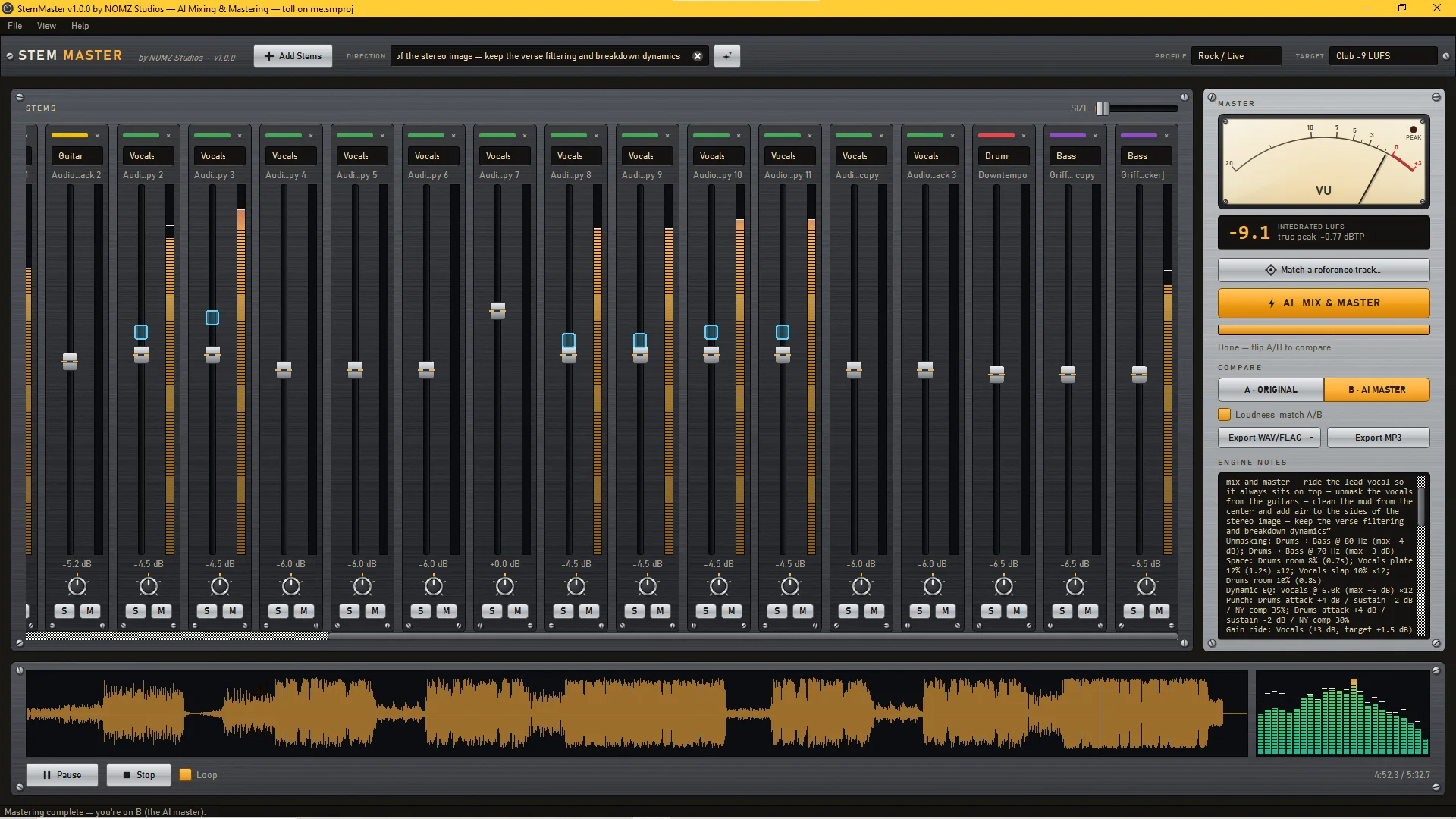
The StemMaster console right after an AI master: 22 channel strips with live meters, cyan automation needles riding the vocal faders, the VU meter at 0 for a −9 LUFS club master, and the Engine Notes panel explaining every decision.
Most AI audio tools are a black box: song in, master out, shrug. StemMaster is the opposite.
rekkerd

Questions? We answer them in public on our Gearspace thread.

Watch it work

The whole thing, start to finish, in under three minutes.

Four stems in, one button, and a finished master — with every decision written down on the way past. No install required to watch: the console you see is the application, not a mock-up.

There are eight more, one per feature — the two engines, direction in plain English, reference matching, stem export and the rest. Prefer YouTube? Open this one there or the whole playlist.

Het dance/techno nummer was eigenlijk meteen wel veel beter dan wat ik er tot nu toe van gemaakt had en werd veel ruimtelijker en helderder, eigenlijk zoals alle nummers klinken tegenwoordig.

The dance/techno track was immediately much better than what I had made of it so far, and became much more spacious and clearer — actually the way all tracks sound these days.

MusicGear (NL) · Quin Lausberg
Hear it

Twenty-four seconds. Same stems, same loudness, one of them mastered.

Four raw stems — drums, bass, synth, FX. The “before” is those stems summed flat with a limiter on them, which is what most people actually do. The “after” is the same stems through StemMaster's AI engine, asked for an industry-standard hiphop mix, with no human touching a fader. Switch between them mid-playback; the position is held, so you're comparing the same bar, not the same song twice.

0:00

Both clips are level-matched to within 0.03 dB. A master is louder than a raw sum, and louder wins every blind test regardless of whether it's better — so the level difference is removed and only the mix is left to judge. The “before” is limited rather than simply turned up because the bare sum clips by 5.4 dB at this loudness, and a distorting opponent would flatter the master for damage the mastering never fixed.

+6.9 dB
air — the top octave, where “expensive” lives
−3.9 dB
sub, so the low end reads as weight instead of rumble
+1.5 dB
crest factor — more dynamic range after mastering, not less, at commercial loudness
Engine Notes — what it wrote about the clip you just heard

Industry-standard hiphop: kick/808 low end owns the mix, so instead of ducking the whole bass I used a kick-keyed spectral cut at 70 Hz to keep the sub clean, and high-passed the sub-heavy FX bed at 110 Hz so only drums and bass live below. Drums get transient snap and light parallel density with a dynamic tame on spitty hi-hat spikes; the wide synth bed is lifted and brightened to fill the top since there are no vocals.

On the master, multiband compression evens the flux-heavy low band (13 dB flux), gentle 1.8:1 glue plus mild saturation add punch and density, and mid/side EQ clears center mud while adding side air; low end already measures mono so no fold-down needed.

Listened back and corrected: lifted air 2.0 dB.

Every move, with numbers
Unmasking
Drums → Bass @ 70 Hz (max −4 dB)
Space
Drums room 8% (0.4 s)
Dynamic EQ
Drums @ 6.5k (max −4 dB)
Punch
Drums attack +2.5 dB / NY comp 20%
Multiband
low band(s) @ 120 / 5000 Hz crossovers
M/S EQ
mid peak 280 Hz −1 dB; side high-shelf 11.0k +1.5 dB
Soft clip
shaved 6.25 dB of transient peaks before the limiter
AI engine (claude-fable-5) · Balanced profile · asked for “industry standard hiphop mix” · target −8 LUFS → achieved −8.3, true peak −0.28 dBTP
See it think

Watch your mix being ridden — fader by fader, word by word.

Most AI audio tools are a black box: song in, master out, shrug. StemMaster is the opposite. Amber marks show every decision the AI made. Cyan needles dance in real time as section automation and the vocal rider work your mix. And the Engine Notes panel writes it all down in plain English — what was done, to which stem, and why the measurements justified it.

Decisions you can read, hear, and override

  • Engine Notes — “Unmasking: Vocals → Guitar @ 2.5k”, “Gain ride: Vocals (±3 dB)”, “Soft clip: shaved 5.9 dB”. Every master ships with its reasoning.
  • Live A/B console — flip between your original mix and the AI master, loudness-matched so louder never cheats.
  • Your hands stay on the faders — tweak any stem after the master; StemMaster re-renders around your moves in seconds.
Every step of the process is logged in an "Engine Notes" panel, showing which track was adjusted, by how much, and why, so users can review it.
Monthly Mixing
The full rack

Everything a mixing engineer reaches for. Nothing you have to configure.

Nothing here is a preset. StemMaster measures your audio first and only applies what the measurements justify — a mix that doesn't need widening doesn't get widened. Each card is a problem you've probably had, and the tool that fixes it.

Every fader is at zero and you don't know where to start

Stem-aware AI mixing. Balances, pans, EQs and compresses each stem by its measured role — kick vs bass masking resolved, mono support elements placed off-center, stereo prints left alone.

Every section sounds exactly the same

Section automation. Detects your song's structure — verses, drops, breakdowns — and rides gain, pan, filters, reverb and stereo width per section. Muffled verses that explode into choruses.

The vocal keeps disappearing under the beat

Vocal rider. A slow envelope follower pins your lead to the mix word-by-word — the fader ride an engineer does by hand, bounded and never pumping.

It sounds crowded and you can't find which frequency

Spectral unmasking. The kick ducks only the bass's low band. The vocal dips only the guitars' presence — and only while it sings. Surgical, modern, inaudible until you A/B it.

Your drums sound flat and lifeless

Punch tools. Transient shaping re-sharpens squashed drums; parallel (NY) compression blends density under thin kits without eating the hits.

Everything sounds stuck flat against the speakers

Three reverbs + slap. Plate, room and hall characters — chosen per stem, sent only to elements that measure dry, never to the low end.

It falls apart on a phone speaker

Master bus, complete. EQ, mid/side EQ, glue and multiband compression, saturation, stereo width, mono-bass fold below 120 Hz — vinyl-safe and mono-proof by construction.

It's quieter than every other track in the playlist

Loudness done right. Streaming −14 or Club −9 LUFS targets, 4× oversampled true-peak limiting, and a soft clipper that engages only at loud targets so club masters punch instead of pump.

You stopped trusting your ears three hours ago

Closed-loop refinement. StemMaster listens back to its own render, measures it against the target curve — or a reference track you drop in — and corrects itself before you ever hear it.

You want it to sound like that one track

Reference matching. Drop in a commercial track: tonal balance, width and dynamics steer toward it while your loudness target is still hit exactly.

Twenty-two stems called “Audio Track 3 copy”

Auto-labeling. StemMaster fingerprints the audio and labels drums, bass, vocals and synths for you.

You know how it should sound, not how to get there

Creative direction. Type what you want — “dark and moody, heavy sub, vocals intimate” — and the AI interprets it into concrete engineering moves, then tells you how.

How it works

Three steps between your bounce folder and a finished master.

1

Load your stems

Drag in WAV, AIFF, FLAC or MP3 stems — 4 or 40 of them. StemMaster labels them automatically and sets up your console.

2

Pick a vibe, press the button

Choose a profile (Rock/Live, Bass-Heavy, Vocal-Forward…), a loudness target, and optionally type a creative direction. Hit AI MIX & MASTER.

3

A/B, tweak, export

Flip A/B loudness-matched, read the Engine Notes, nudge any fader — then export 24-bit WAV, AIFF, FLAC or MP3 — or 32-bit float — hitting your target within a tenth of a dB.

The engine that does the mixing and mastering is built in. It runs entirely on the user’s own machine, with no account, no connection and no upload, and it is the default.
rekkerd
Private by design

Your music never leaves your machine.

StemMaster is a real desktop app, not a cloud service wearing one as a costume. All audio analysis and rendering happens locally, on your computer.

No subscription

One purchase, yours forever. Free updates across the 1.x series.

No account, no telemetry

No sign-in, no usage tracking, no analytics SDK buried in the installer. The one call it makes by itself is a one-time licence activation — then it's offline, rechecking within 30 days so a disconnected machine keeps working.

Audio stays local

Your stems and masters are processed entirely on your machine. Only compact measurement summaries are ever sent to an AI model — never audio.

Bring your own AI

Works out of the box with the built-in analysis engine — fully offline. Plug in your own API key (Anthropic, OpenAI, z.ai, and other compatible providers) to unlock the LLM engine. Your key lives in Windows Credential Manager, not a config file.

Pricing

One price. No meter running.

$99 one-time
Lifetime license, free 1.x updates
  • Full app, every feature — nothing gated
  • Activate on up to 3 of your machines — the same 3 across Windows and macOS
  • Built-in engine works fully offline
  • Optional LLM engine with your own API key
  • 24-bit WAV / AIFF / FLAC / MP3 export, plus 32-bit float
  • 14-day money-back guarantee
Get StemMaster — $99
14-day money-back guarantee. No questions asked — email us and we refund it.
Offers transparency by documenting AI decisions and allowing manual overrides.
80% Noizefield · Max Noizefield
Secure checkout by Polar. Your license key arrives by email.
Not sure yet? Download the free demo for Windows or Mac — the full app; exports disabled and a short audio tag on mastered playback.
On Windows, SmartScreen may show a notice on first install (we're a new publisher) — click More info → Run anyway. The Mac build is signed and notarized by Apple, so it opens with a double-click.
FAQ

Questions, answered.

What do I need to run StemMaster?
A 64-bit Windows 10 or 11 PC, or a Mac with Apple Silicon (M1 or later) running macOS 15 or newer. That's it — no DAW required, no Python, no plugins. StemMaster is a self-contained desktop app (~280 MB installed). Intel Macs and older versions of macOS are not supported.
Windows shows a blue "Windows protected your PC" screen — is the installer safe?
Yes. That's Microsoft SmartScreen being cautious with software from a new publisher — it flags installers that haven't yet built a download history, not ones that misbehave. Click More info, then Run anyway. The notice fades as more people install StemMaster, and code signing is in the works to retire it for good.
Do I need an AI subscription or API key?
No subscription, ever. There are two engines and StemMaster ships with both. The AI engine takes a plain-English direction — “industry standard hiphop mix” — and decides the whole treatment around it; that is the engine that mastered the clip at the top of this page, and it needs your own API key (Anthropic, OpenAI, z.ai and other compatible providers work). You pay your provider pennies per master, and we never see your key or your audio. The built-in analysis engine needs no key and no internet at all: it mixes and masters entirely offline from measured evidence in your stems. It is genuinely good and it is what most sessions run on — but it follows the measurements rather than a creative brief, so if you are comparing against what you heard above, that clip was the AI engine's work.
Is it a VST plugin?
No — StemMaster is a standalone application. Bounce your stems out of any DAW (Ableton, FL Studio, Logic via export, Reaper, Cubase…), drop them in, and master. Your DAW stays your DAW; StemMaster is the mastering room across the hall.
What audio formats does it support?
Loads WAV, AIFF, FLAC, MP3 and OGG stems at any common sample rate (mixed rates are resampled automatically). Exports 24-bit WAV, AIFF and FLAC, 32-bit float WAV, 16-bit WAV with proper dither, and MP3 320 kbps.
How is this different from online AI mastering services?
Three ways. First, StemMaster works on your stems, not a finished stereo file — it can ride the vocal, duck the bass under the kick, and automate sections, which no stereo-file masterer can do. Second, it shows its work: every decision is visible, explained, and overridable. Third, it's a one-time purchase rather than a subscription, and your audio never leaves your computer — no upload queue and no privacy questions. Full comparison with LANDR and eMastered, including where something else is the better choice.
Can I tweak the AI's mix?
Yes — that's the point of the console. After a master, the faders snap to the AI's mix. Move any fader or pan knob and StemMaster re-renders the master around your tweak in seconds, keeping the loudness target intact. A/B stays loudness-matched so you're always comparing fairly.
What's your refund policy?
14 days, no questions asked. Try the free demo first if you'd like — it's the full app, with exports disabled and a periodic audio tag on mastered playback.
How many machines can I use it on?
Your license activates on up to 3 of your own machines (studio PC + laptop + one spare). Deactivate and move anytime. One purchase covers both platforms — and it is the same 3 in total, not 3 of each. The Mac build needs Apple Silicon (M1 or later) on macOS 15 or newer; Intel Macs are not supported.